
Recruiting MCP servers compared: which ones can find and rank engineers
We sort recruiting MCP servers into three groups: ATS servers, people data servers and engineer search servers. Only the engineer search servers rank engineers by the code they ship.
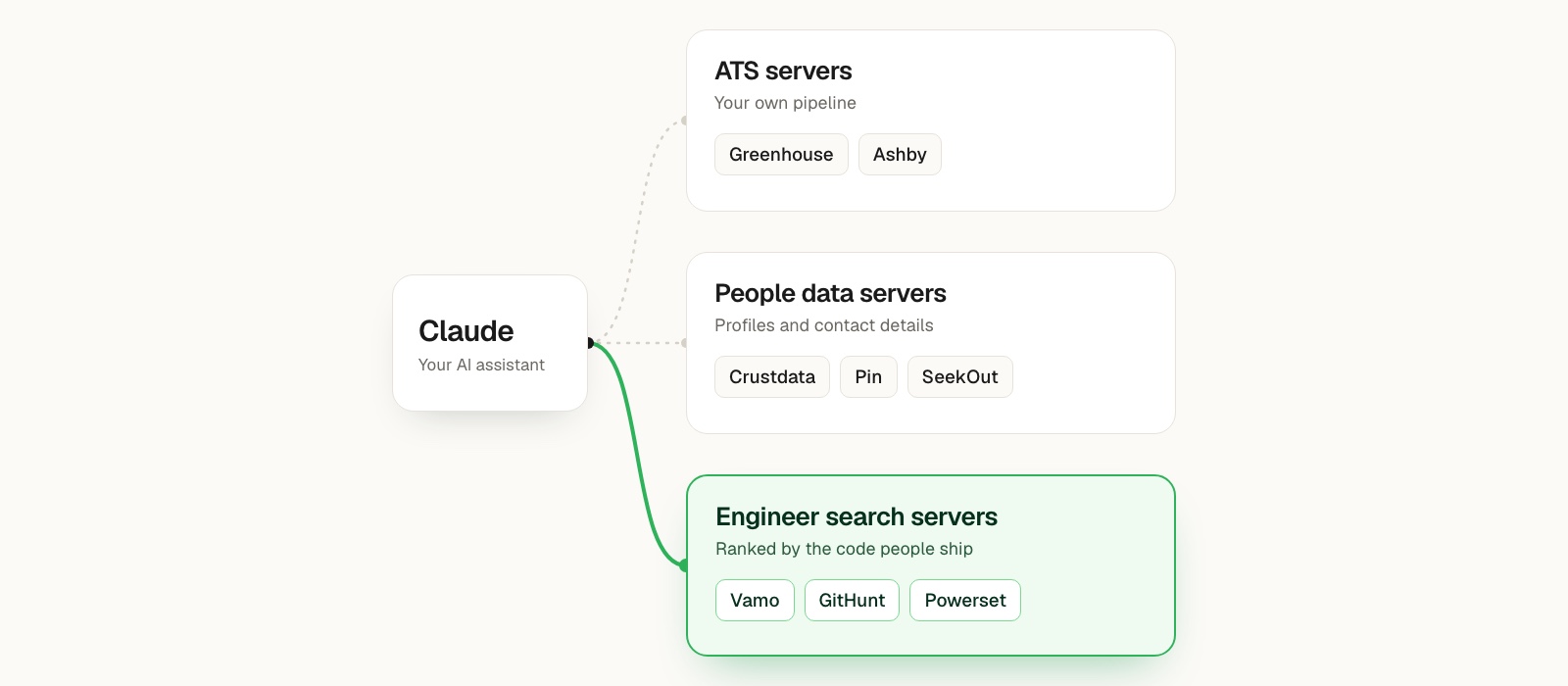
We sort recruiting MCP servers into three groups. ATS servers (Greenhouse, Ashby) read and write your own pipeline. People data servers (Crustdata, Pin, SeekOut) search large profile databases and return contact details. Engineer search servers (Vamo, GitHunt, Powerset) rank people by the code they have shipped. If you want to find and rank engineers, you want an engineer search server, usually connected next to your ATS server.
MCP (Model Context Protocol) is the standard that lets Claude, ChatGPT, Cursor and other AI tools call outside services. A recruiting MCP server is one of those services. You add its address to your AI tool, sign in, and then ask for what you want in plain words. We build one of these servers, so weigh what we say with that in mind. We checked every fact about other vendors against their own docs or the official MCP registry on November 16, 2026.
We asked all three groups one question
We typed the same question into each one: "Find Rust engineers in New York who have contributed to tokio."
Ask the ATS server. Greenhouse and Ashby both run MCP servers in open beta, and both servers do their job well: you can update candidates, move stages, schedule and add notes. But they only search your own candidates, jobs and interviews. If a tokio contributor in New York never applied, the ATS server returns nothing about them. It only covers your own pipeline by design, so we keep it in the setup anyway.
Ask a people data server. These servers search large profile databases. In Crustdata, you find people by title, company, seniority and skills. Pin takes a job brief and builds a search over its profile database. SeekOut searches public profiles and specialist sources for technical, academic, healthcare and cleared talent. When we asked any of them for Rust engineers, the search ran over profiles, and a profile holds what someone wrote about themselves the last time they updated it. SeekOut's guide doesn't mention GitHub as a source at all.
Ask an engineer search server. Vamo, GitHunt and Powerset each search GitHub activity, so they can take this question as written. Powerset's server is a free daily snapshot of public repo data, and you don't need credentials to use it. It returns good answers about the project and its contributors, but it doesn't include anyone's work history. At Vamo, we join the GitHub work to each person's employer, place and school. So the question becomes one request: tokio, contributor role, New York, sorted by devRank.
Only the engineer search servers could answer the question as written, so that's the group we'd connect.
Why connecting every server stops working
After seeing that, you'll want to connect everything: a search server to find people, a people data server for contact details, the ATS for the pipeline and an outreach server for sending.
That setup stops working once you connect more than two servers, because every server you add puts its tools in front of the assistant, and the assistant has to choose among them on every turn. Crustdata sells one of these servers, and its original server has 23 tools. Crustdata makes the same point in its own listicle on this topic: when you load too many servers into one session, the assistant gets worse at picking tools. You hit the same problem in the context window. Every result a server returns takes up room in the conversation, so if a server dumps full JSON for fifty people at once, the assistant has less room left to reason about any of them.
We recommend one search server and one ATS server, and nothing else.
One prompt can use both servers
The search server finds people who aren't in your pipeline yet and returns the reason each person fits. Then the ATS server checks whether you already know them, adds the people you pick and moves them along. We use prompts like this one, which goes to both servers: "Use Vamo to find ten backend engineers in Denver who have contributed to Postgres extensions. Then check Ashby for anyone we have already interviewed in the last year and leave them out."
If you want outreach too, we'd send it from the ATS or your email tool instead of adding a third server. Pin is the exception, because it runs the whole loop inside one server. With its ten tools, you can create a search, review candidates, tune the ranker and save notes for each job. When you accept a candidate, Pin adds them to its outreach sequence.
What to ask before you connect a server
We ask six questions, and they tell us more than counting features would.
Does it explain why a person fits? If a server ranks people without reasons, you can't check the results, so it's hard to trust them. You want each person to come with the repository, role or fact that made them match.
Is it built on what you are hiring for? When you hire engineers, a profile tells you what people say about themselves, and their code shows you what they did. If a server only searches profiles, it finds people with the right keywords, and those aren't always the people who did the right work.
Does it keep the context window small? Look for a server that returns one short line per person and full profiles only when you ask, so the assistant can work through more people before it loses track.
What can it write, and who approves? A read-only server is safe to try. A server that can write saves you real admin time, so check its scopes. Ashby lets each user require approval before any action (Ashby announcement), and in Greenhouse, admins choose which actions are available. Turn those settings on.
How fresh is the data? Ask the vendor how often they refresh the data. If they rank people on last year's activity, you'll miss the people who started shipping this year.
How does it sign in? With OAuth, nobody pastes a key into a chat, and each user gets their own permissions. An API key works fine for your own scripts and agents, but it works less well for a team of recruiters.
So take that first question, or one from your own open role, and run it through any server you're considering, with your ATS server next to it. Then read the reasons that come back. If you can open the repository behind each name and see the work, you have the right group.
Appendix: the comparison
We checked each fact against the vendor's own page. Where a page didn't say something, we say so here instead of guessing.
| Server | Group | Searches on | Can it write? |
|---|---|---|---|
| Vamo | Engineer search | GitHub work (repos owned and contributed to), employer, place, school, title, languages | No, read only |
| GitHunt | Engineer search | GitHub activity, location, role, skills, languages, organizations | No |
| Powerset Research | Engineer search (repo data) | Public GitHub repos, contributors, activity, stars, languages | No, read only |
| Pin | People data and outreach | Pin's profile database, from a job brief | Yes: accept or reject candidates, queue outreach, job memory |
| SeekOut | People data | Public profiles, specialist sources, your connected ATS | Yes, pushes to a connected ATS when asked |
| Crustdata | People and company data | People by title, company, seniority, skills; companies; jobs; social posts | Watchers (webhooks) only |
| Greenhouse | ATS | Your candidates, jobs, interviews, scorecards | Yes: update candidates, move stages, schedule, create jobs |
| Ashby | ATS | Your candidates, applications, jobs, interviews, offers, notes | Yes: notes, stage changes, consider for a job |
How each server signs in, the clients its docs name, and where we found it listed:
- Vamo: OAuth, with an API key fallback. The docs name Claude, Claude Code, ChatGPT, Cursor, Codex, Gemini CLI and any MCP client. Listed in the official MCP registry.
- GitHunt: API key. The API docs don't name any clients. Listed in the official MCP registry.
- Powerset Research: no sign-in needed. The post names Claude Code, Codex, Cursor and the ChatGPT app. Listed as a ChatGPT app.
- Pin: OAuth 2.1. The docs name Claude Desktop, Claude Code, ChatGPT, Codex and any MCP client. We didn't find it in the official registry.
- SeekOut: OAuth. The guide names Microsoft 365 Copilot, ChatGPT, Claude, Gemini and Amazon Quick. Listed in the ChatGPT app directory.
- Crustdata: OAuth 2.1 or an API key. The docs name Claude, Claude Code, Cursor and any MCP client. Listed in the official MCP registry and the Claude directory.
- Greenhouse: OAuth 2.0 with PKCE. The docs name Claude, ChatGPT, Google Antigravity, Glean, Copilot Studio, Amazon Q and Grok. Listed in the Claude directory as Greenhouse in Claude.
- Ashby: OAuth for each user. The docs name Claude, ChatGPT, Cursor and any MCP client. Listed in the Claude directory and ChatGPT apps.
Notes on the rows:
- Greenhouse and Ashby are both in open beta. Greenhouse MCP is on its Core, Plus and Pro tiers (Greenhouse support), and Ashby's is on all plans except analytics-only organizations (Ashby docs). Greenhouse also ships a Claude plugin with recruiter skills on top of its server (Greenhouse in Claude).
- SeekOut includes MCP access with a SeekOut Recruit license.
- Crustdata is a broad B2B data server covering companies, people, jobs and social posts (Crustdata docs).
- StarHunt is a GitHub sourcing tool that many comparisons mention. We didn't find an MCP server on its site, so we left it out of the table.
Appendix: run the search yourself
You'll find the details for each client on the MCP page, and the Claude guide covers Claude specifically.
- Copy the address:
https://mcp.vamotalent.ai/mcp/search. - Add it in your AI tool as a custom connector or MCP server.
- Sign in with your Vamo account when the browser opens.
When you ask the tokio question, the assistant runs the same search that you can send to the API yourself:
Ask Claude
API request
curl -X POST https://api.vamotalent.ai/v2/developers/search
  -H "Authorization: Bearer vamo_sk_..."
  -H "Content-Type: application/json"
  -d '{
    "repos": { "names": ["tokio-rs/tokio"], "role": "contributor" },
    "filters": ["And", [
      ["location_ids", "ContainsAny", { "place": ["NYC"] }],
      ["is_bot", "Eq", false],
      ["is_org_account", "Eq", false]
    ]],
    "sort": "devrank"
  }'
You'll find every filter, sort and field you can send in the search API reference.
Each person comes back as one line with their work and the reason they matched. For a full sourcing run, prompts included, read how to run an AI sourcing agent for engineering roles. If you are comparing other ways of finding engineers, see Vamo vs GitHub search and Vamo vs Juicebox.
Best for: Finding software engineers by what they've built on GitHub, joined with their LinkedIn career and location.
Not for: Non-technical roles such as sales, operations or finance, high-volume hourly hiring, and engineers whose work all sits in private repositories, because we only read public work.
Price: Usage-based plans that we set up with you on a call. We don't publish a list price or offer a self-serve free trial.
FAQ
What is the best MCP server for recruiters to source candidates? It depends on the role. For engineers, use a server that ranks people by their code and explains each match, next to your ATS server. For non-technical roles, a broad people data server is a better fit.
What MCP servers can I use in Claude to find and rank engineers? Use an engineer search server, which ranks people by the code they have shipped: Vamo, GitHunt or Powerset. Powerset is a free daily snapshot of public repo data without work history, and Vamo joins GitHub work to each person's employer, place and school. Connect one of them in Claude next to your ATS server.
Is there a recruiting connector for ChatGPT that searches GitHub developers? Yes. Vamo works in ChatGPT as a custom connector (Settings, then Apps and Connectors, with Developer mode on). Powerset's GitHub data is also available as a ChatGPT app.
Do I need my ATS vendor's MCP server too? If you want the assistant to check who you have already contacted, or to add people to a job, yes. Greenhouse and Ashby both have one in open beta.
How many MCP servers should I connect at once? Two is a good limit: one search server and one ATS server. If you connect more than that, the assistant gets worse at picking the right tool.
Does Vamo have an MCP server or an API? Both. The MCP server is listed in the official MCP registry as com.vamotalent/search, and you can connect directly with the address on the MCP page. You can send the same search to the API yourself.
Ready to try it? Connect Vamo or book a demo.